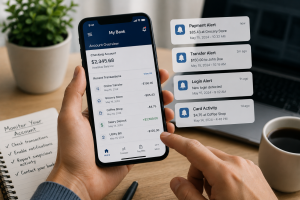

Digital banking apps are now part of everyday life. Many people use banking and payment apps to send money, pay bills, shop online, and manage their finances directly from their phones. These apps are fast, easy to use, and very convenient. However, as online banking becomes more popular, scammers are also finding new ways to take advantage of people online.
In many cases, scammers do not need to hack the banking app itself. Instead, they try to trick you into giving away passwords, verification codes, or personal banking information. They may send fake text messages, create fake banking websites, or pretend to be customer support staff.
Some scams are designed to create panic and pressure you into reacting quickly. For example, you may receive a message saying there is suspicious activity on your account or that your banking app will be blocked unless you act immediately.
Understanding how these scams work and learning simple online safety habits can help you better protect your banking apps and personal information.
-
-
Use strong and unique passwords
-
Strong passwords are very important because they help protect your online banking accounts from hackers and scammers. Weak passwords such as names, birthdays, or simple number combinations can often be guessed easily.
Many people also use the same password for multiple accounts. This can become dangerous because if one account is hacked, scammers may try to use the same password to access your banking apps, email accounts, or social media profiles.
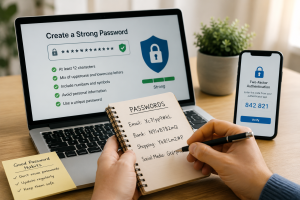
A strong password should:
- Be difficult to guess
- Include letters, numbers, and symbols
- Avoid personal information such as birthdays or names
- Be different from passwords used on other accounts
Using different passwords for different accounts adds extra protection and reduces the risk of multiple accounts being compromised. To help manage your passwords, you can use a password manager to safely create and store them. If you prefer not to use a password manager, it is also acceptable to keep a password book or notebook, provided it is stored securely and kept private.
2. Enable two-factor authentication (2FA)
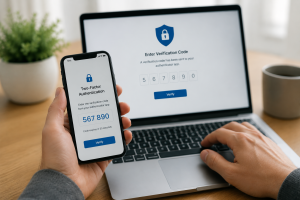
Two-factor authentication adds extra security to your online accounts. After entering your password, you must complete a second step, such as entering a code sent to your phone or authentication app.
This extra step makes it harder for scammers to access your account, even if they know your password.
Many online scams try to trick people into sharing these verification codes through fake calls or phishing messages. For this reason, you should never share security codes with anyone.
To improve account security:
- Enable 2FA on banking and payment apps
- Use trusted authentication methods
- Never share verification codes
Official banks and customer support teams will never ask you to reveal security codes by phone or text message.
Learn more about Google 2-Step Verification.
3. Be cautious of suspicious messages and links
Many banking scams start with fake text messages or emails that appear to come from a bank or payment service. These messages often warn you about “unusual activity” or claim that urgent action is needed.
The goal is usually to scare you into reacting quickly without thinking carefully.
Scammers may try to:
- Get you to click fake links
- Steal your banking details
- Collect passwords or verification codes
- Direct you to fake banking websites
Some fake websites look very similar to official banking websites, making them difficult to recognise.
Warning signs may include:
- Urgent or threatening language
- Spelling or grammar mistakes
- Requests for personal information
- Suspicious links
- Unknown phone numbers or email addresses
If a message looks suspicious, avoid clicking links and contact your bank directly using official contact information.
Taking a few extra seconds to check a message carefully can help prevent online scams.
4. Never Share Verification Codes or Personal Banking Information
Verification codes and one-time passwords (OTPs) are designed to help protect your banking accounts. However, scammers often try to trick people into sharing these codes through fake support calls or phishing messages.
Some scammers may pretend to be:
- Bank employees
- Security teams
- Fraud departments
- Technical support staff
They may sound convincing and try to pressure you into acting quickly.
You should never share:
- OTP codes
- PIN numbers
- Passwords
- Full banking details
- Verification codes
Even if someone claims to work for a bank, official organisations will never ask you to share sensitive security information through phone calls or text messages.
Keeping verification codes private is very important because these codes help protect your accounts from unauthorised access.
5. Keep Your Phone Secure
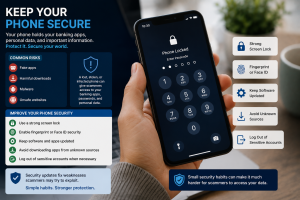
Many people use banking apps on their phones every day, which makes phone security extremely important. A lost, stolen, or infected phone can create serious risks if it is not properly protected.
Cybercriminals may target phones through:
- Fake apps
- Harmful downloads
- Malware
- Unsafe websites
If your phone becomes compromised, scammers may gain access to your banking apps, saved passwords, or personal information.
To improve phone security:
- Use a strong screen lock
- Enable fingerprint or Face ID security
- Keep software and apps updated
- Avoid downloading apps from unknown sources
- Log out of sensitive accounts when necessary
Security updates are important because they often fix weaknesses that scammers may try to exploit.
Simple security habits can make it much harder for scammers to access your personal information.
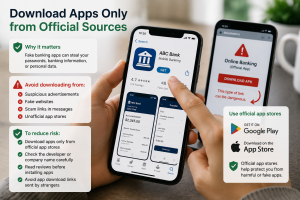
6. Apps Only from Official Sources
Fake banking and payment apps sometimes appear online pretending to be official services. These fake apps are designed to steal passwords, banking information, or personal data.
You may accidentally download fake apps through:
- Suspicious advertisements
- Fake websites
- Scam links sent through messages
- Unofficial app stores
These apps may look professional and realistic, which can make them difficult to recognise.
To reduce risk:
- Download apps only from official app stores
- Check the developer or company name carefully
- Read reviews before installing apps
- Avoid app download links sent by strangers
Using official app stores helps reduce the risk of downloading harmful or fake apps.
Official mobile security guidance:
Google Play Protect Safety Information
Apple App Store Security Guide
7. Monitor Account Activity Regularly
Many people only notice scam activity after money has already been taken from their account. Regularly checking your banking apps and transaction history can help you notice suspicious activity early.
Most banking apps now offer instant notifications for:
- Payments
- Transfers
- Login attempts
- Card activity
These notifications can help you quickly recognise unusual account activity.
You should:
- Check your transactions regularly
- Enable account notifications
- Report suspicious payments immediately
- Contact your bank if you notice unfamiliar activity
Acting quickly after noticing suspicious activity may help prevent additional financial loss and improve the chances of protecting your account.